
Gig Driver: Free Financial Intelligence for Rideshare & Delivery Drivers
Track your mileage, calculate true net profits after expenses, and maximize your daily gig earnings.
Why Is Gig Driver 100% Free?
Designed to cut your driving expenses—not add another monthly bill to your list
Lowering Expenses, Not Adding Them
Gig drivers already face high fuel, maintenance, and tax costs. We created a free mileage and profit tracker so you don't have to pay to manage your own money.
No Hidden Paywalls or Subscriptions
Unlike paid mileage tracking apps that lock essential tax and profit tools behind subscriptions, every feature here stays 100% free forever.
Built to Protect Your Bottom Line
Our goal is to help Uber, Lyft, and DoorDash drivers keep more of their hard-earned income—starting with zero software fees and no credit card required.
How It Works: 3 Steps to Calculate Your True Profit
Log your shift in seconds to automatically calculate real net earnings, vehicle costs, true hourly pay, and complete platform profitability.
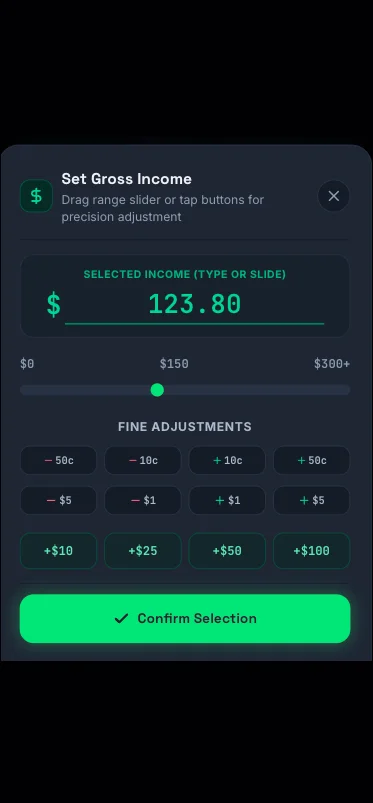
1. Enter Gross Earnings
Input your total pay for the shift from Uber, Lyft, DoorDash, or any gig platform.
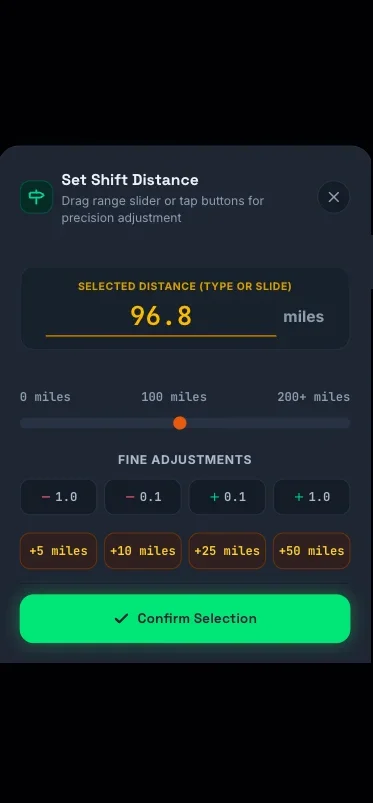
2. Input Total Mileage
Enter your miles driven to factor in fuel costs, depreciation, and vehicle expenses.
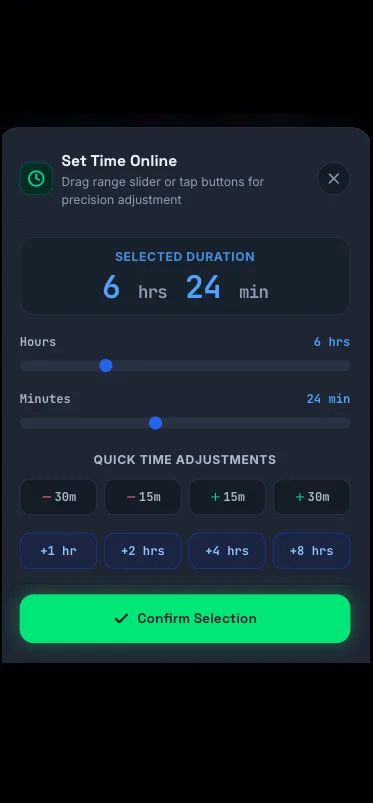
3. Set Active Hours
Select your shift duration to measure your actual hourly take-home rate after costs.
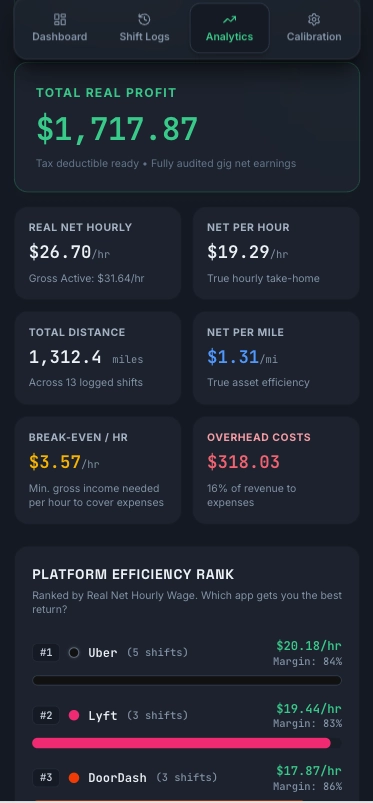
✨ Instant Analytics!
Instantly see your true net hourly rate, expense breakdown, and most profitable gig platform.
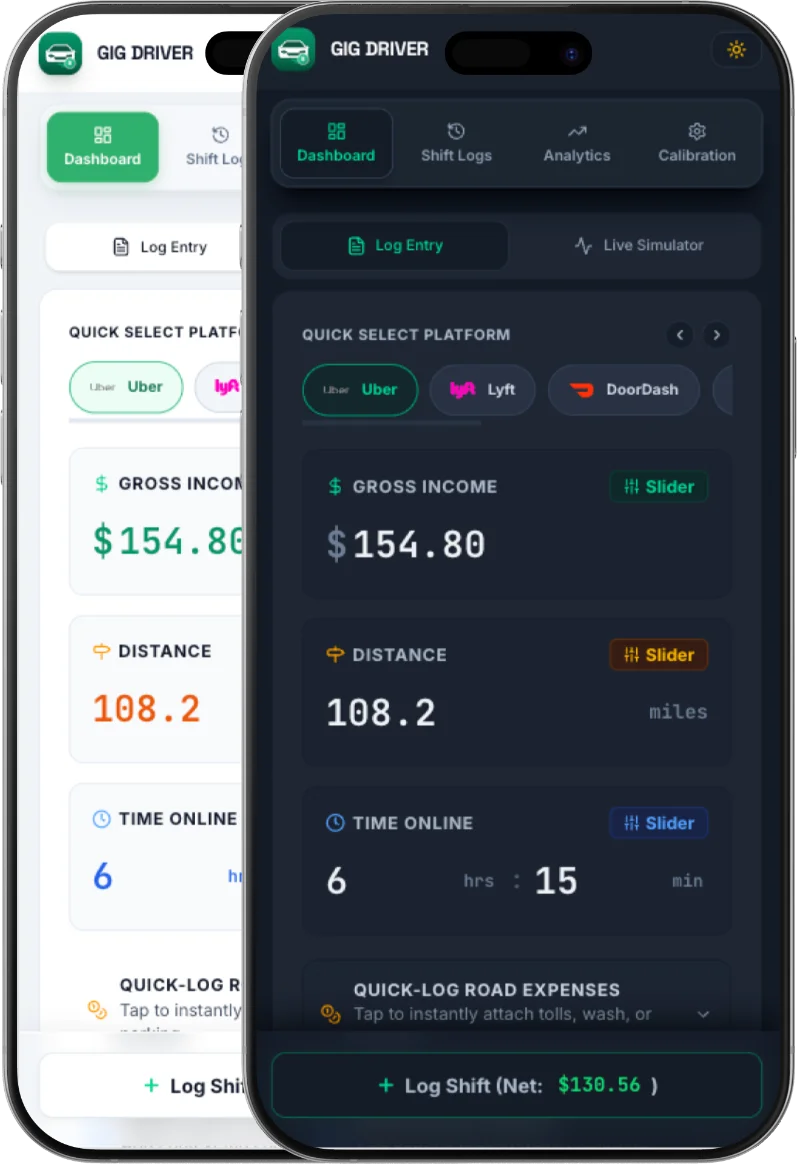
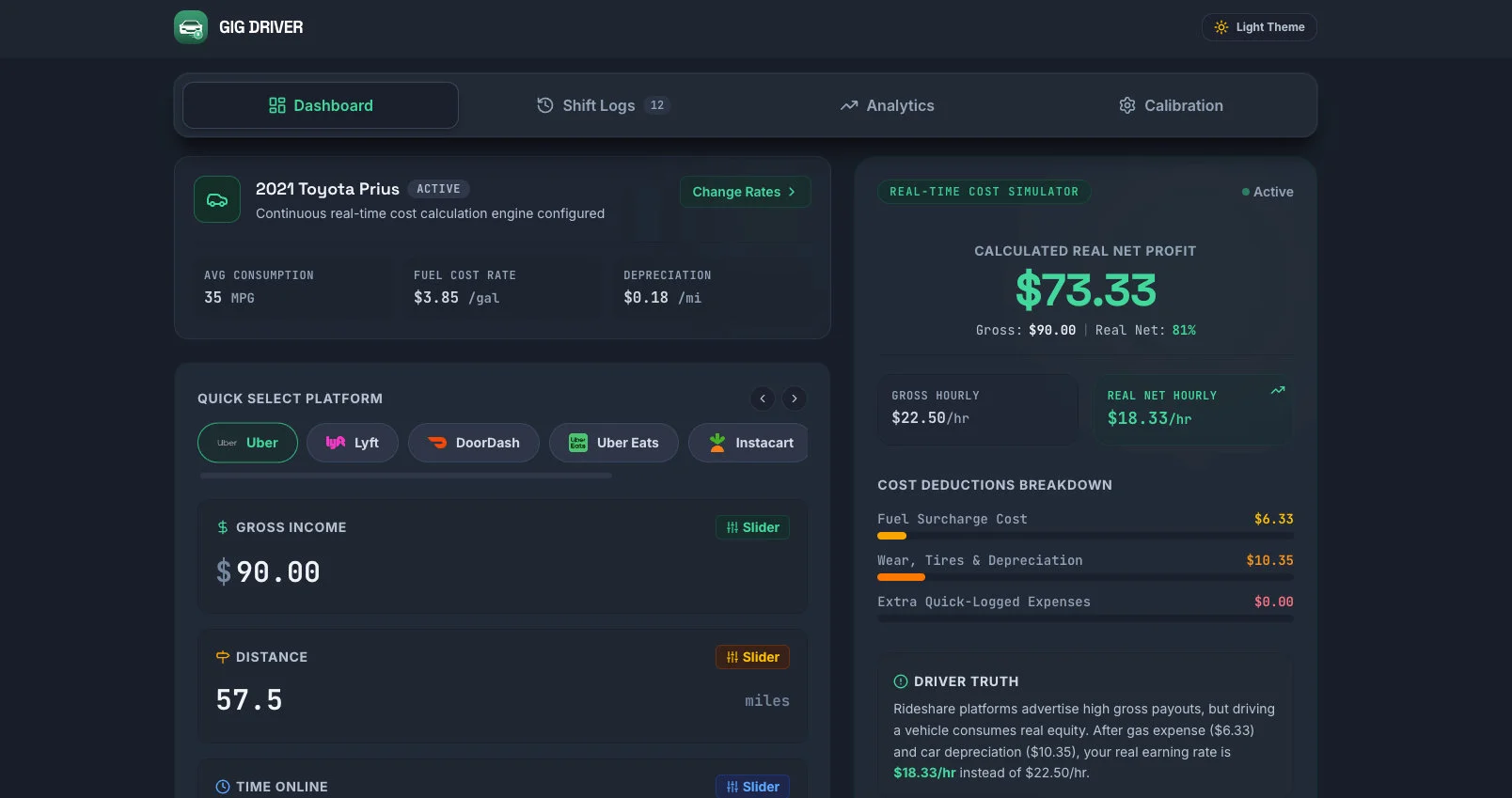
1. Dashboard: Your Free Daily Shift Control Center
The Dashboard acts as your day-to-day command center to log active shifts instantly and monitor real-time financial performance on the road.
Core Shift Inputs
- Gig Platforms: Uber, Lyft, DoorDash, UberEats, Instacart, Flex.
- Gross Revenue: Record earnings instantly.
- Distance & Hours: Log miles and online time.
Quick Expenses
One-tap buttons to log instant road costs:
Smart Estimator
- True Net Profit: Auto computes take-home pay.
- Hourly & Mileage: Instant $/hr and $/mi metrics.
- Fuel & Vehicle Costs: Real-time expense & fuel calculations
2. Shift Logs & History: Free Mileage & Expense Tracker
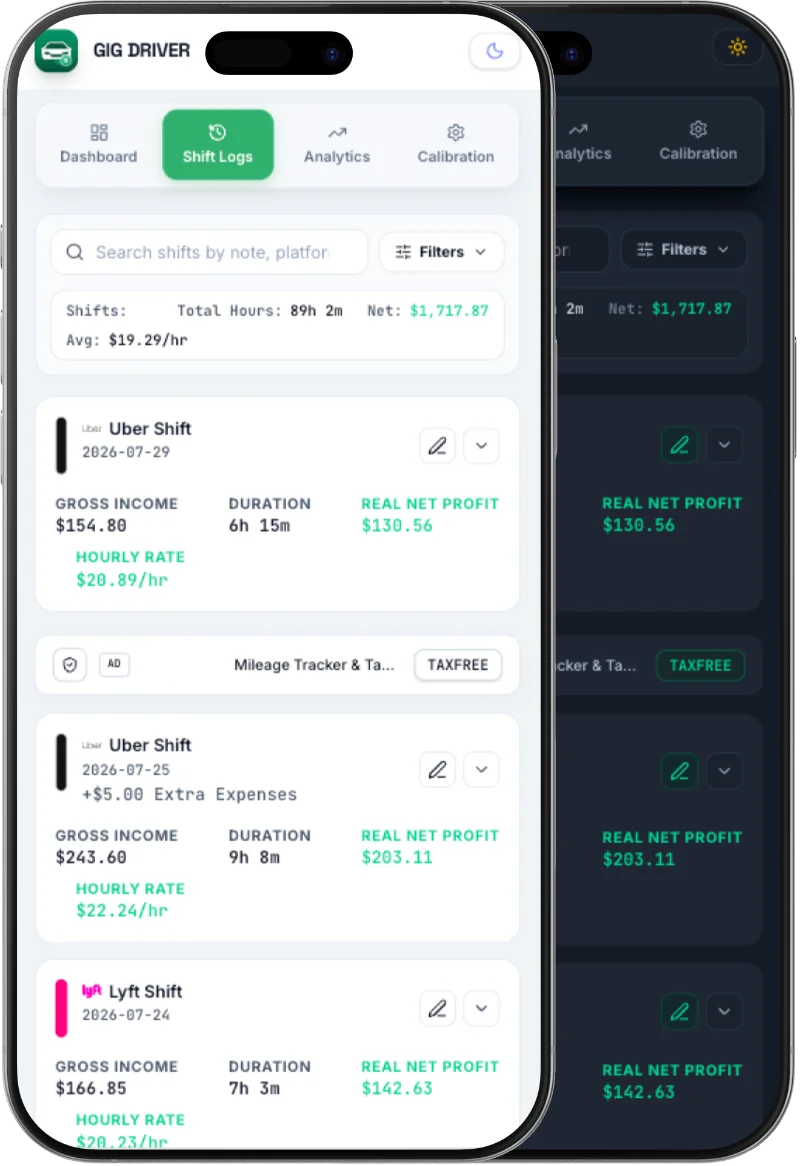
The Shift Logs section maintains a complete audit trail of all your past shifts, complete with detailed expense breakdowns, net profits, and performance metrics.
✓ Shift Cards
Quick-summary cards displaying date, online hours, mileage, gross revenue, and final net profit.
✓ Color-Coded Profitability
Visual color indicators that let you gauge shift profitability and net margin at a glance.
✓ Expanded Details
In-depth breakdown of fuel, depreciation, tolls, parking, custom expenses, $/hr, and $/mi.
✓ Search & Date Filters
Filter shifts by Today, This Week, Month, Year, or Custom Ranges, plus keyword search.
✓ Live Filtered Summary Banner
Sticky header summarizing total gross revenue, true net profit, total distance, and working hours for your selected filtered view.
3. Analytics & Financial Intelligence Hub
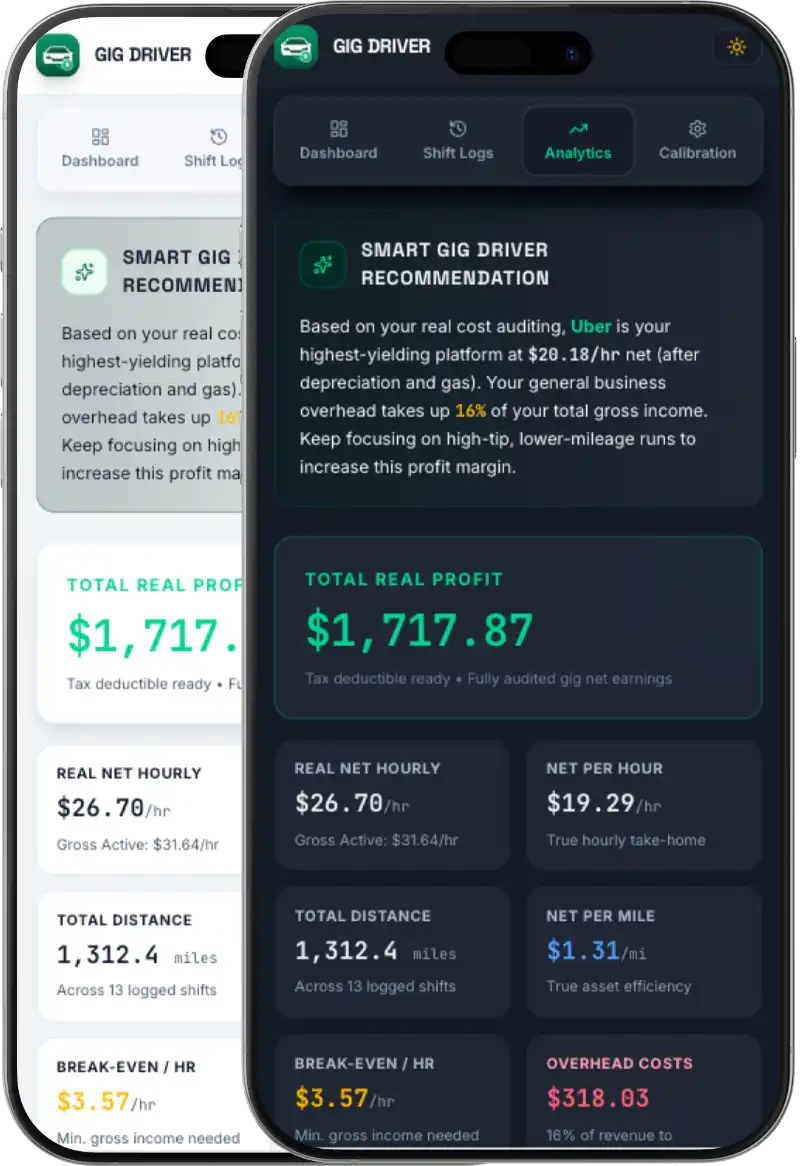
The Analytics tab serves as the strategic command center of the app, analyzing historical shift data to deliver deep financial reports and actionable strategies—all completely free.
Financial Aggregates
Gross revenue vs net profit, online hours, mileage driven, net per mile, and break-even hourly rates.
Strategic Insights
Dead-time alerts flagging excessive waiting, distance efficiency warnings, and optimal platform tips.
Platform Rankings
Compare Uber, Lyft, DoorDash, and Flex side-by-side sorted by Net Hourly Earnings ($/hr).
Weekday Planner
Discover which gig app performs best on each specific day of the week with historical tips.
4. Calibration & Vehicle Settings
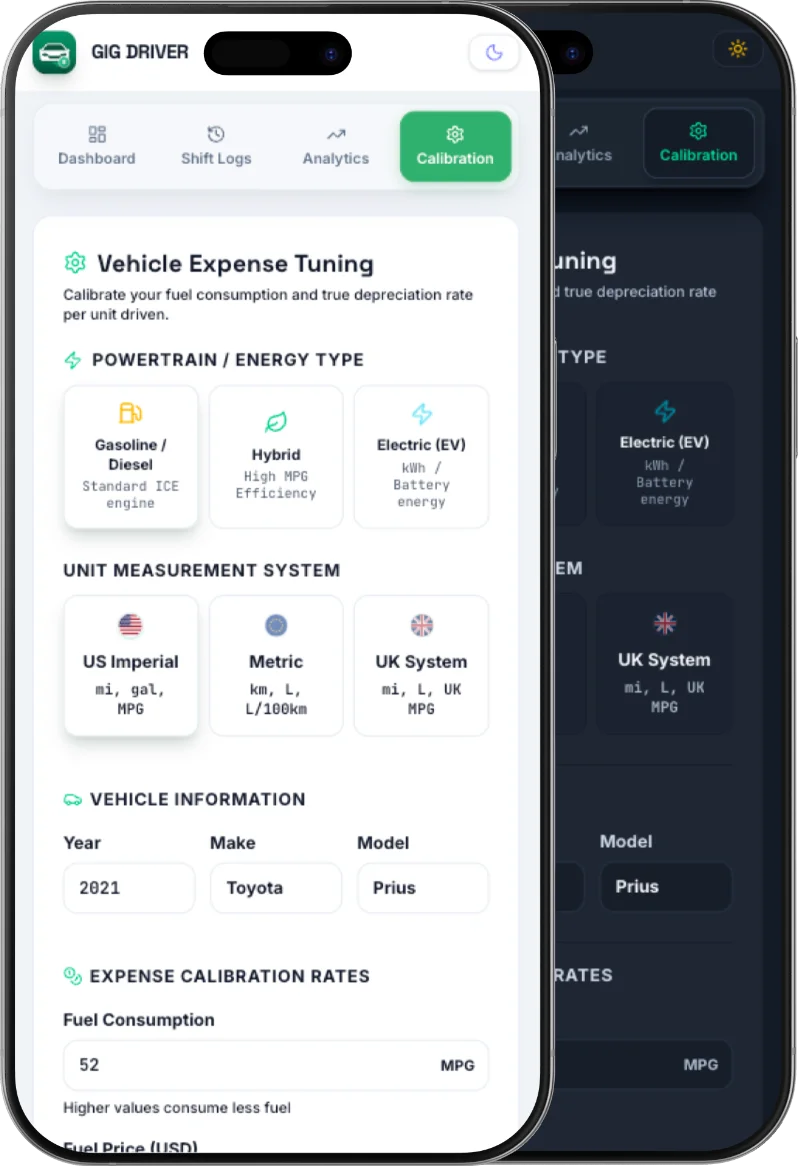
Tailor all financial calculations to match your exact vehicle specifications for institutional-grade accounting accuracy.
Set powertrain type (Gasoline, Diesel, Hybrid, EV), energy consumption rates (MPG, L/100km, mi/kWh), and switch effortlessly between Metric, US Imperial, and UK units.
Calibrate gas prices or electricity rates ($/kWh) and custom wear-and-tear per mile/km, supported by AAA industry benchmark tiers and historical audit logs.
Set default toll, car wash, and parking rates to accelerate shift entries during high-pace driving shifts.
Export shift history to CSV files for tax preparation or seamlessly import backup files to restore data.
Native UI/UX & Desktop Experience
Designed for comprehensive financial analytics, multi-column reporting, and deep data visualization on desktop screens.
True Net Profit & IRS Tax Deduction Estimator
Calculate your real take-home pay after fuel, vehicle depreciation, and potential tax write-offs.
$922.50
Net Margin: 80.2% | Profit/Mile: $1.68
💵 $368.50 / week ($19,162 / yr)
Need deeper multi-platform analytics, shift log tracking, and custom expense management?
More Calculations in App →Gig Driver FAQ
Everything you need to know about tracking rideshare and delivery earnings completely free.
Is Gig Driver completely free to use?
Yes, Gig Driver is 100% free. There are no premium subscriptions, hidden charges, or credit card requirements. You get full, unrestricted access to all shift logging, expense calculations, and performance analytics tools at zero cost.
How does Gig Driver calculate my true net profit?
Gig Driver calculates your true net profit by deducting hidden operating expenses from your gross earnings. It factors in your vehicle’s specific fuel consumption, real-time fuel prices, mileage depreciation (wear-and-tear), tolls, parking, and custom shift expenses to reveal your actual take-home pay.
Do I need a live GPS connection to track my mileage with Gig Driver?
No, Gig Driver is a lightweight, privacy-focused manual shift and expense log. Instead of draining your battery with continuous live GPS tracking, you simply input your shift distance (miles or kilometers) to instantly compute your fuel costs, depreciation, and net earnings per mile.
Can I use Gig Driver for multiple delivery and rideshare apps at the same time?
Absolutely. Gig Driver is built for multi-app drivers. You can track shift data and compare net earnings across major platforms like Uber, Lyft, DoorDash, UberEats, Instacart, Amazon Flex, and local courier services to see which app pays you the highest true net hourly rate.
How does vehicle depreciation calculation work in the app?
Through the Calibration settings, you can customize your vehicle profile (Gasoline, Hybrid, EV, or Diesel) and set your estimated depreciation cost per mile/km. The app then automatically deducts this vehicle wear-and-tear expense from every shift you log.
Can I export my shift logs for tax reporting and deductions?
Yes! You can export your full shift history, mileage records, and logged expenses into a structured CSV file anytime. This provides a clean audit trail of your driving activities and business expenses to share with your accountant or use during tax preparation.
Is my financial shift data secure?
Yes, your data belongs entirely to you. Gig Driver processes and retains your shift information securely, and you can easily back up, import, or export all your logs and settings to a CSV file whenever you need.
Does Gig Driver support both Metric and Imperial systems?
Yes! Gig Driver fully supports Metric, Imperial, and UK measurement systems. Whether you calculate your efficiency in Miles/Gallons (US), Kilometers/Liters (Metric), or Miles/Liters (UK), you can easily toggle your preferred units in the Calibration settings for seamless, accurate tracking anywhere in the world.
Maximize Your Driving Profits Today
Start tracking shift earnings, compare platform profitability, and keep track of every tax deduction with Gig Driver—100% Free.